

Start here, About, How a Monday works, FAQ, The backtest
So the context is that I felt that I needed to build an investment strategy that only takes 30 minutes a week and that I can execute and update at a time that is convenient to me. The Monday morning open seemed like the best time, and I purposely built it to limit it to only 30 minutes a week to maintain this portfolio strategy.
So why 30 minutes a week? Well, I strongly feel that this strategy should only take a small part of our time but return greater growth than the average index. I didn't want an investment strategy that becomes a full-time second job, that you need to monitor every minute of the open market throughout every day, whatever the latest tweet is, the latest earnings report or the latest financial market situation and how that affects your portfolio. I didn't want this extra stress and frankly didn't have the time to manage something at that scale and complexity.
So I, from day one, built Lionshare to only take a few minutes every week and then that's it. The rest of the week runs its course without me needing to update anything. And we repeat the process at the Monday morning open, which is 9:30 a.m. New York time.
So what do I do on the Monday morning? The system starts its updates quite early in the morning. It runs a Python script that is connected to a data provider API that runs the same rules every week, and then returns the full list of normally 10 stocks to hold, the exact weights in the portfolio, and the stop levels to place for each of the positions. This arrives in my inbox as an email in the morning at around 7:30 a.m. By this time, I already arrive at my computer with a cup of coffee, ready to review what it was saying about the market in general and see how the portfolio changed week over week.
From there, I can see what the change will need to be, what I need to buy, what I need to sell, how I need to adjust it. And I have enough time, around two hours from receiving the email until the market opens, to make any adjustments or plan to make any adjustments for when the market is open.
I used my background as an electronic engineer that's been in the corporate world for quite a while to build this financial model, which is Lionshare, that I then share with everyone. From January 12, 2026 the portfolio was run using my own money publicly on Dub and as of 28 October is up 114.4% while the S&P 500 including dividends is up 12.7% over the same period.
What I do on this page is just a recap of what a Monday would look like. I'll take you through how the email arrives in the inbox, what information it contains, how to go through the information, and simply update it in an efficient way. My goal with this whole process is to make updating a portfolio super simple, because simplicity is easy to execute every week consistently.
I think anyone that is in the investing space understands the power of compounding. Compounding is usually expressed within the context of returns, so how much money grows and compounds over time. But I think the habit compounds too, being able to check in every Monday with your portfolio and make the adjustments. And then the rest of the week is not needed. You can spend your time and your energy and your focus somewhere else.
So let's get into what a Monday looks like step by step when the email arrives.
When the email arrives, it's split into two main sections.
The first one is an overall view of the stance of the market. The system first has an overview of what the current market conditions are like, and it tries to understand if the conditions are right to be in a concentrated portfolio of stocks, which is Lionshare when it is normally running, or if it is better to temporarily step out of the stock market and focus on a different fund, which in some cases can be gold, commodities or other types of funds. It does not forecast the markets.
The next section is the exact positions. In every email there's a table that has a list of all of the tickers, so the exact ticker that you would buy or sell, and the position in terms of percentage size of the portfolio. So a ticker might have a size of 10%, 30%. Usually the largest position only has 30%, and the rest are smaller than that. It is a very concentrated portfolio most weeks.
Along with the percentage of the portfolio, there's also the stop loss level that is set for that week and holds throughout the rest of the week. This is to limit any downside risk that could be unforeseen. In some weeks, a few stocks do trigger the stop loss, but this is a reaction that limits the downturn within that week. It's also why it allows us to not look at the portfolio throughout the week.
The approach is then simple. For any account size, you take the account value, or the amount of money you would like to have invested in the portfolio for that week, times the position size in percent to get the value of each position. You can then do the simple math to compare what is its current position in your account versus what the portfolio is suggesting the size should be, and then depending on if it's more or less, you buy or you sell.
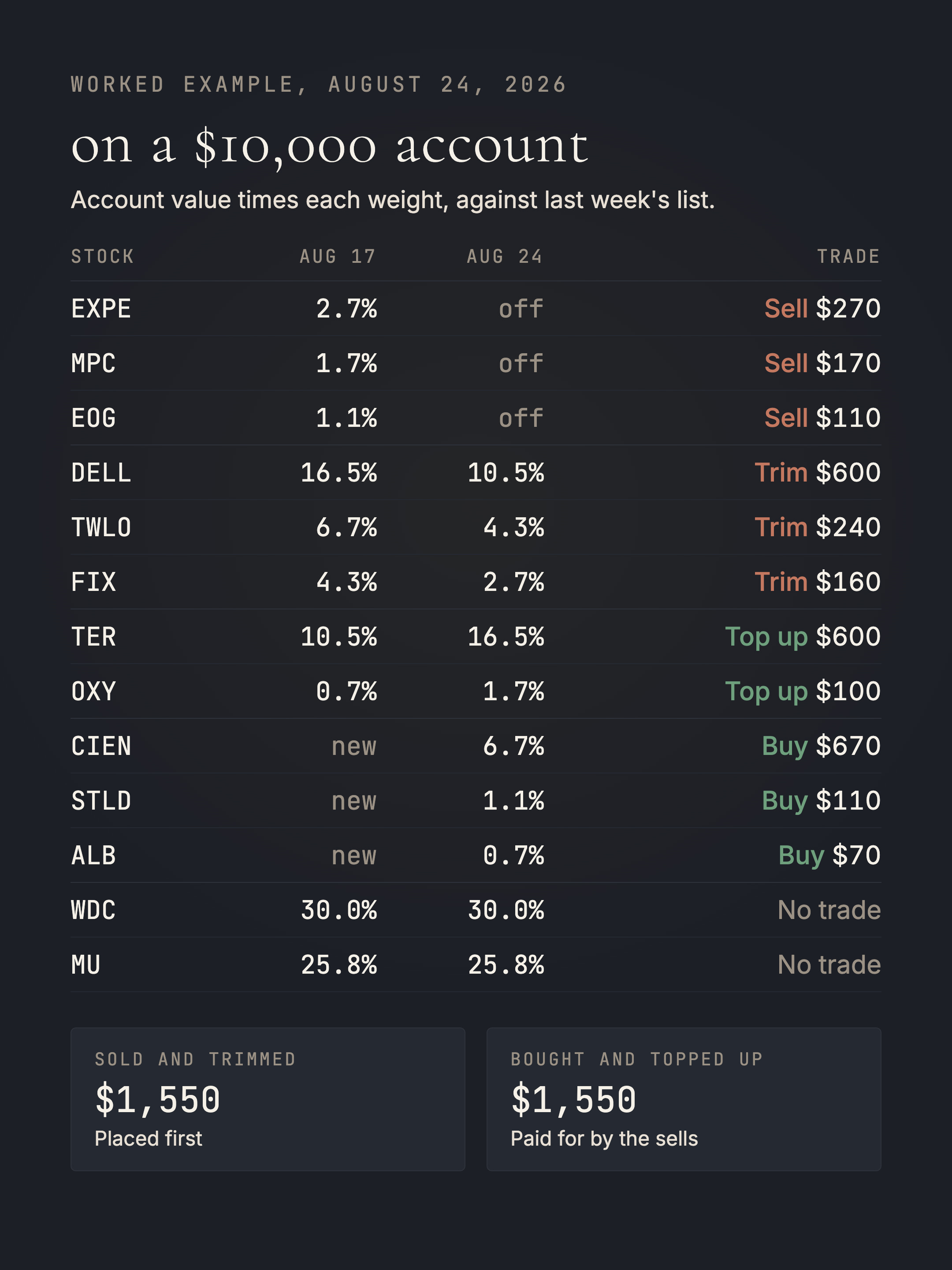
The way that we do this is always first to sell any positions that are completely exited, so positions that are not on the table for the week, or to reduce any positions that are currently overweight, higher value than suggested by the portfolio. We want all of the sells to clear first to free up the cash needed to buy. After the sells have been executed, then you place all of the buy orders, starting with the largest buy orders first, going to the smallest ones, until all of the positions are as close as possible to your desired weight that you calculated.
There might be some small tweaks, as some orders might not fill completely, and some orders might take a little bit longer to fill. So there's always a little bit of a period just to make sure that everything is as close as possible to the portfolio.
After that is done, I then go and place the stop orders on each of the positions.
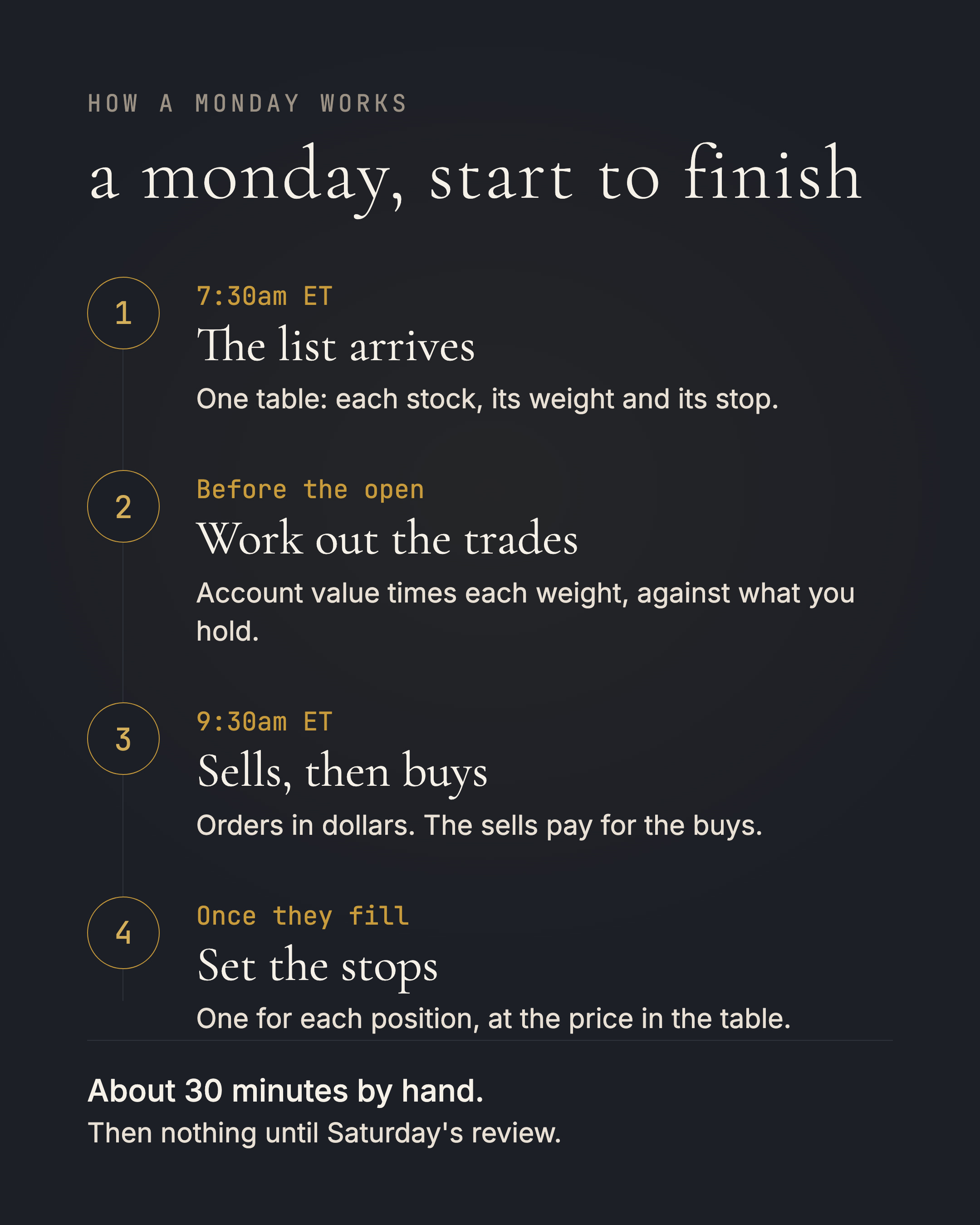
The amount of orders you can place and calculate by hand is feasible for a portfolio of 10 positions. My approach is to use a broker that has an API, so I can use a Python script to run the orders automatically. It executes pretty quickly, so in my own account the full portfolio is updated within 10 minutes from the opening of the stock market. But when I did it manually, I used to do it in about 30 minutes to buy and sell.
The strategy is also not that sensitive to timing. So you don't have to place all of the orders exactly at the market open, or as close as possible to it. It's completely fine.
If it's the first time that you are buying into the portfolio, it's probably the easiest, because you just have buy orders that go out. You know the exact sizes, based on the account size that you would like to target, and it's as simple as placing the buy orders for that week and setting the stop losses.
And there are some weeks where we sell all of the stocks and then we buy only into one fund. Then it is a simpler approach also, because you are selling all of your open positions first, closing out all of them, which is generally easier, and then buying into the one fund that the strategy is selecting to hold.
When we then go back into stocks, it's the inverse. We sell the fund, which is one position to be closed completely, and then you do a simple buy order for all of the stocks listed in the table. So pretty straightforward.
One issue, if you have a small account value that you're putting into all of these positions, is that some positions could have a very small value in dollars. And then the broker sometimes requires full shares to be covered by a stop loss. Fidelity and Webull only allow market and limit orders to be placed on a portion of a share, but no stops on fractions. If you can't place stop orders, you can always put a notification at the stop level. So if the stock reaches that specific trigger level, it should notify you, and then you can manually sell should it be needed.
Before your first Monday, I would always recommend that you only update the portfolio holdings for Lionshare on a Monday morning, to track the positions and the returns as close as possible.
I would always check that you can buy US stocks in your broker. You can have a look at some previous lists of what we've held in the portfolio before, just to make sure that your broker allows trading on the US stock market. If you live in the EU or UK you need to check the fund weeks too, because brokers there typically can't buy you a fund that's listed on the US exchange. And then secondly, just check that your account has the money loaded into it and ready to execute at the next market open.
After the routine is done, so this is around 10am, when the orders are placed, you make sure that the account is reflecting what you intended it to, and the stop orders are at the right levels. Then there's nothing left to do.
And this is by design. I didn't want to have to continuously monitor a position for a specific level, a specific crossover, or some indicator to tell us when to buy or sell. They could fire at any minute, while I'm busy in a different work meeting, or at home, or with a loved one, enjoying quality time.
With Lionshare, the email goes out on Saturday morning recapping exactly how the portfolio performed throughout the week, either good or bad, trying to show the portfolio returns in a transparent and real way. And then on the next Monday morning the process repeats itself.
What you do throughout the week is up to you. I personally like to use it for personal training, such as marathon training, which has been my current focus, and making time with friends and family on afternoons when I get to do that.
That's it.
Every Monday before the market opens I share the portfolio in the open, and every Saturday I report the week's result, good or bad. The full list goes to paying readers every Monday before the market opens. It is $39 a month or $350 a year, and the weekend review is free for everyone.